
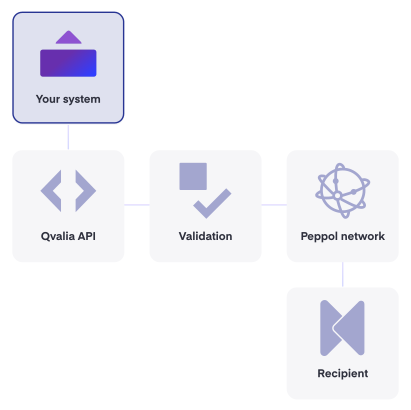
Peppol API at a glance
From API key to first request
Our onboarding team supports you through integration and testing.
export ACCOUNT_REG_NO=YOUR_ACCOUNT_REGISTRATION_NUMBER

# Identifies the account in every Transaction API request
Use this value in the request path for every Transaction API call.
export QVALIA_API_KEY=YOUR_SANDBOX_API_KEY
export QVALIA_BASE_URL=https://api-test.qvalia.com
Keep sandbox and production credentials separate.
curl -X POST \
  ${QVALIA_BASE_URL}/transaction/${ACCOUNT_REG_NO}/invoices/outgoing \
  -H Authorization:${QVALIA_API_KEY} \
  -H Content-Type:application/json \
  -d @invoice.json
The response confirms that the document was received. Validation results and delivery status follow through webhooks or document status.
export QVALIA_API_KEY=YOUR_PRODUCTION_API_KEY
export QVALIA_BASE_URL=https://api.qvalia.com
Track processing and delivery through webhooks or document status.
One account, six APIs
Invoicing API
Send and receive invoices and credit notes over Peppol, with validation before delivery.
Order API
Send and receive purchase orders over Peppol, with order responses, changes and cancellations for the full ordering flow.
Partner API
Create and manage end-customer accounts and Peppol IDs from your own platform, with webhooks for document events.
OCR API
Extract structured data from PDF invoices for review and further processing.
Enrichment API
Classify documents and line items, and enrich transactions with structured data.
Accounting API
Generate posting suggestions from incoming invoices for faster review and posting.
More ways to connect
When an API integration is not the right fit, or you need more than document exchange.
- SFTP
Exchange files in XML or CSV over SFTP when an API integration is not an option. - ERP connectors
Ready-made connectors for common ERP and accounting systems. - Peppol MCP server
Give AI agents and MCP clients structured access to transactions, line items, delivery status and validation. - Punchout
Connect a supplier catalog to the buyer’s procurement system. - B2B checkout
Add a B2B payment and invoicing option to a WooCommerce store, with delivery over Peppol.
Peppol reference for developers
This page covers Qvalia’s APIs and the Peppol documents they carry. The Peppol standard behind them, with specifications, validation rules and code lists, is covered in our Peppol documentation and implementation guide. The full endpoint reference is on api.qvalia.io. The normative Peppol specifications are published by OpenPeppol on docs.peppol.eu.
Peppol documents and their APIs
| Document | Peppol specification | Qvalia API |
| Invoice | Peppol BIS Billing 3.0 | Invoice APIs |
| Credit note | Peppol BIS Billing 3.0, credit note | Credit Note APIs |
| Order and order response | Peppol BIS Ordering | Order APIs, Order Response APIs |
| Order agreement | Peppol BIS Order Agreement | Order Agreement APIs |
| Order change and cancellation | Peppol BIS Advanced Ordering | Order Change APIs, Order Cancellation APIs |
| Despatch advice | Peppol BIS Despatch Advice | Despatch Advice APIs |
| Catalogue | Peppol BIS Catalogue with Response | Catalogue APIs |
| Delivery status | Message Level Response and Message Level Status | Message Level Response APIs, Message Level Status APIs |
Validation and errors
Code lists
Addressing and lookup
Testing and operations
Sandbox
Test your integration against your own systems without affecting real customers or financial flows.
Versioning
Breaking changes ship as a new API version, with at least one month’s notice.
System status
View current service availability and incident updates.
Security
Read how Qvalia works with information security, business continuity and trust.
Peppol for your business or your customers?
Peppol Access Point
You want to send and receive Peppol documents for your own business. Connect to Qvalia’s Peppol Access Point and integrate it with your ERP or through the API.
Partner solutions
Offer Peppol to your own customers with the model that fits your role. Use Embedded Peppol in your product through Qvalia’s API, or run a Hosted Access Point under your own Peppol Service Provider identity.
Questions developers ask
Find more implementation guidance in our knowledge base.
Is there a test environment?
Yes. The sandbox at api-test.qvalia.com uses a separate API key, so you can test without affecting real customers or financial flows. Follow the Peppol API step-by-step guide in the Knowledge base.
Which formats does the API accept?
JSON by default, or XML. Both use UBL 2.1-based structures for the relevant Peppol document endpoints. Set Content-Type and Accept to application/json or application/xml. See Peppol message types for the business documents and processes supported by the network.
How do I authenticate?
With an API key in the Authorization header, or with a short-lived token (JWT) that you get from the /token endpoint using your key. You get separate keys for test and production.
How do I know if a document was delivered?
Subscribe to webhooks, or poll the API. Qvalia sends events when a document arrives, when it is delivered and when delivery fails. For Peppol-level response messages, see Message Level Status in the Knowledge base.
Do I need to implement Peppol transport myself?
No. Qvalia operates the Access Point and handles recipient lookup, AS4 transport and delivery. You send a document to the API. Read how SMP and SML service discovery locates the receiving endpoint.
Can I integrate without writing code?
Yes. Use an ERP connector, or exchange XML or CSV files over SFTP.
Which Peppol documents can I exchange?
Invoices, credit notes, orders, order responses, order agreements, order changes and cancellations, despatch advice, catalogues and message level responses. The table under Peppol reference for developers shows the specification behind each one. Which document types your setup includes depends on the selected service and integration. See What are the message types in Peppol? for an overview.
How does the API find the recipient’s endpoint?
Qvalia uses the recipient’s Peppol ID to locate its Service Metadata Publisher (SMP) through the Service Metadata Locator (SML). The SMP returns the document capabilities, process and transport endpoint needed for delivery. Read Peppol SMP and SML: how service discovery works.
What happens when a document fails Peppol validation?
A document with a fatal validation error must be corrected before it is sent. The error code identifies the rule set and the part of the document that needs investigation. See How Peppol validation works and Peppol validation rule codes.
How can I check a recipient’s Peppol ID and document capabilities?
Use Qvalia’s Peppol ID search to find the participant and the document capabilities published in the directory. For identifier structure and schemes, see What is Peppol ID? in the Knowledge base.