Enrichments
Posting and classification
Requested per document
Support step
Capture
PDF invoices to structured data
Taxonomy
UNSPSC
Results returned per product ID
Processing
Asynchronous
Poll at most every 30 seconds
Posting suggestions and UNSPSC classification
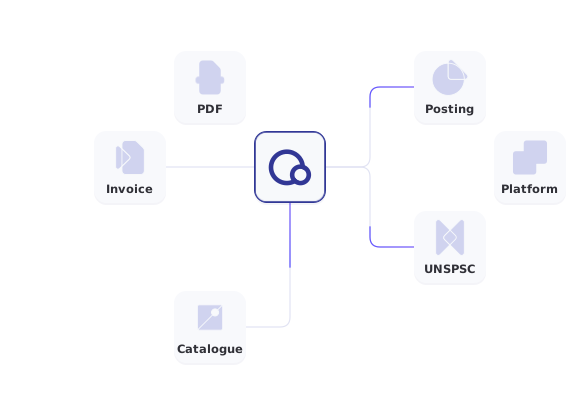
Posting and classification are the enrichments. Capture is the step that turns a PDF invoice into structured data, so both can run.

Posting suggestions
Suggested account coding for each line of a supplier invoice, trained on your organization’s posting history. Your team confirms each suggestion.

Product classification
UNSPSC codes for invoice lines and for products from catalogues and price lists, each returned with your own ID.

Capture as support
When an invoice arrives as a PDF, capture extracts header data and line items first, so posting and classification have structured data to work on.

Collect results
Each request returns a polling ID. Collect the result per enrichment type, polling no more than once every 30 seconds.
Classify a product list in two requests
Send product names with your own IDs, for example items from a catalogue, a price list or your item register. The response gives you a polling ID, and the result returns each product ID with its UNSPSC classification.
- Your product IDs are echoed back in the result
- Authenticate with an API key or a JWT from the Account API
- Poll no more than once every 30 seconds
- Separate sandbox and production base URLs
● ● ●
Sandbox request: classify products
curl -X POST \
"https://api-test.qvalia.com/enrichment/$ACCOUNT_REG_NO/categorisation" \
-H "Authorization: $QVALIA_API_KEY" \
-H "Content-Type: application/json" \
-d '{
  "enrichmentTypes": "unspsc",
  "products": [
    { "id": 1, "product_name": "Nitrile gloves, size M" },
    { "id": 2, "product_name": "A4 copy paper, 80 g" }
  ]
}'

# Collect the result with the pollingId
curl "https://api-test.qvalia.com/enrichment/$ACCOUNT_REG_NO/$POLLING_ID" \
-H "Authorization: $QVALIA_API_KEY"
Enrichment endpoints
All paths are relative to the sandbox or production base URL and scoped to your account registration number.
| Request | Endpoint | Returns |
| Enrich an invoice | POST /enrichment/{accountRegNo}/invoice | Polling ID |
| Classify products | POST /enrichment/{accountRegNo}/categorisation | Polling ID |
| Get all results | GET /enrichment/{accountRegNo}/{pollingId} | Status, or results per type |
| Get one result | GET /enrichment/{accountRegNo}/{pollingId}/{enrichmentType} | Capture, posting or classification result |
Sandbox: api-test.qvalia.com. Production: api.qvalia.com. The Enrichment API is billed separately, and Qvalia support enables the enrichments your account uses.
Where enriched data is used
Posting suggestions and UNSPSC codes feed other processes, in your own platform or in Qvalia.
- Accounts payable
Confirmed account coding follows the invoice into approval and posting. - Catalogues and price lists
Add a UNSPSC code to catalogue and price-list items that lack one. - Spend analysis
UNSPSC codes let you group purchases by segment, family and class across suppliers. - Your own platform
Return suggestions and classifications to your users in your own interface.
Choose your starting point
Posting
Accounting API
How posting suggestions are trained, checked and confirmed by your team.
Product data
UNSPSC classification
How Qvalia classifies invoice lines and product data with UNSPSC.
Capture
OCR API
The capture step on its own, with a free test for your own PDF invoice.


Enrichment API FAQ
What is the Enrichment API?
A REST API with two enrichments: posting suggestions for supplier invoices and UNSPSC classification of invoice lines and products. Capture is a support step that turns PDF invoices into structured data before posting and classification run.
Why is capture a support step?
Posting and classification work on structured data. Invoices that arrive as Peppol or other XML documents already have it. A PDF invoice is captured first, so its header data and line items can be posted and classified. Capture is also available on its own through the OCR API.
How do posting suggestions work?
They are trained on invoices your organization has already posted. Each new supplier invoice gets suggested account coding per line, and your team confirms it. Read more on the Accounting API page.
Can I classify catalogues and price lists?
Yes. The classification request takes a list of products, each with your own ID and a product name, so items from a catalogue, a price list, an item register or invoice lines are sent the same way.
Which taxonomy does classification use?
UNSPSC. The result returns each product ID with its classification, so you can match it back to your own records.
Is there a sandbox?
Yes. Use api-test.qvalia.com for testing and api.qvalia.com in production.
Is the Enrichment API included in other Qvalia APIs?
No. The Enrichment API is billed separately and needs additional permissions. Qvalia support enables the enrichments your account uses.


