Documents
Invoices and credit notes
Plus self-billing and invoice responses
Formats
JSON or UBL XML
UBL 2.1-based, one document per request
Events
Signed webhooks
Received, delivered, delayed and failed
Availability
99.8% per month
Contractual, with service credits
Send an invoice with one request
Post the invoice as JSON or UBL XML to the outgoing endpoint of your account. Qvalia validates it, looks up the recipient on Peppol and delivers it. Credit notes, self-billing documents and invoice responses follow the same pattern.
- Sandbox at api-test.qvalia.com, production at api.qvalia.com
- API key in the Authorization header, or a short-lived token (JWT)
- An Idempotency-Key header makes retries safe
● ● ●
Sandbox request: send an invoice
curl -X POST \
  "https://api-test.qvalia.com/transaction/$ACCOUNT_REG_NO/invoices/outgoing" \
  -H "Authorization: $QVALIA_API_KEY" \
  -H "Content-Type: application/json" \
  -H "Idempotency-Key: $(uuidgen)" \
  -d @invoice.json
How an invoice moves through the API
Your system works with one API. Qvalia operates the Peppol Access Point behind it.

1. Submit
Post one document per request. If the data is invalid, or the recipient is not registered for the document type and no other delivery channel is configured, the API answers 422 with a stable error code, before anything is sent.

2. Validate and deliver
Qvalia checks the document against the applicable Peppol rules, finds the recipient’s Access Point and delivers the document over AS4.

3. Follow the status
Webhooks report delivery, retries in progress and failures. The status endpoint returns each document’s latest status without the document payload.

4. Receive
Incoming invoices and responses wait on the incoming endpoints. The read endpoint returns unread documents and marks them as read, so the next call returns only new ones.
Invoice documents and endpoints
Every path starts with /transaction/{accountRegNo}, the registration number of your account. Each document type has outgoing and incoming endpoints, a read endpoint for unread documents and a status endpoint.
| Document | Endpoint | Peppol specification |
| Invoice | /invoices | Peppol BIS Billing 3.0 |
| Credit note | /creditnotes | Peppol BIS Billing 3.0 |
| Self-billing invoice | /selfbillinginvoices | Peppol BIS Self-Billing |
| Self-billing credit note | /selfbillingcreditnotes | Peppol BIS Self-Billing |
| Invoice response | /invoiceresponses | Peppol BIS Invoice Response |
| Message level response | /messagelevelresponses | Peppol BIS Message Level Response |
Which document types your account uses depends on the service and plan. Request and response schemas are in the Invoice API and Credit Note API references. For all of Qvalia’s APIs, see Peppol APIs and developer tools.
Check the recipient before you send
Look up a Peppol ID before you submit the invoice. The response shows whether the participant is registered on Peppol and which document types it can receive, so your system can flag a missing or wrong ID before the network rejects the invoice.
- Narrow the check to one document type with
docTypeRoot, for exampleInvoiceorCreditNote - The Peppol ID is the scheme and the identifier, for example
0007:1234567890 - Same base URLs and authentication as the Transaction API
● ● ●
Sandbox request: look up a recipient
curl \
"https://api-test.qvalia.com/account/$ACCOUNT_REG_NO/action/lookup/peppol/0007:1234567890?docTypeRoot=Invoice" \
-H "Authorization: $QVALIA_API_KEY"
Built for production integrations
The details that decide whether an integration holds up at volume, all documented in the API reference.
- Safe retries
Send an Idempotency-Key, and a repeated request returns the original response instead of creating a second invoice. - Signed webhooks
Each event carries an event ID and, once you set a signing secret, a signature you can verify. - Event replay for 30 days
Fetch any delivered event again by its ID, for example after downtime on your side. - Status without the payload
Reconcile at volume with lightweight status records, filtered by date, document ID or update time. - Clear rate limits
Limits are counted per account, and a 429 response tells you how long to wait. - Attachments
Add PDF files and images inside the message. The whole request, attachments included and Base64-encoded, must stay under Peppol’s 100 MB limit.
One invoice, the format each recipient needs
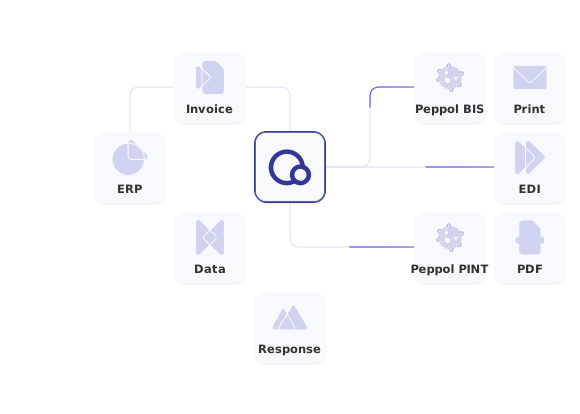
Send the invoice once. Qvalia validates it, looks up the recipient and delivers it on the Peppol network as Peppol BIS Billing 3.0 or Peppol PINT. When the recipient is not on Peppol, Qvalia can deliver through EDI, PDF by email, print and B2C internet banks in selected markets. These are additional delivery channels, not Peppol specifications. See which business message formats Qvalia supports.
If your system cannot produce Peppol BIS, upload the invoice in the format it already creates: Svefaktura 1.0, EDIFACT INVOIC, cXML, Finvoice 3.0, XRechnung, CII or the XML in ZUGFeRD and Factur-X. Qvalia converts it to Peppol BIS Billing 3.0, validates it and sends it. See sending invoices in your existing format.
Choose your starting point
Software platforms
Embedded Peppol
Offer e-invoicing to your own customers. The Partner API creates their accounts and Peppol IDs, and the Invoicing API carries their documents.
ERP and finance teams
Peppol Access Point
Connect your ERP or finance system to Peppol through the API, SFTP or a ready-made connector.
Developers
Quick-start guide
Go from API key to your first sandbox invoice, step by step, with request examples.


Invoicing API FAQ
What is an e-invoicing API?
An e-invoicing API lets your software send and receive structured electronic invoices without building the network connection itself. With Qvalia’s Invoicing API, your system posts invoices as JSON or UBL XML, and Qvalia validates them and delivers them over the Peppol network.
Which invoice documents can I send and receive?
Invoices, credit notes, self-billing invoices and credit notes, and invoice responses, each with outgoing and incoming endpoints. Which document types your account uses depends on the service and plan.
Do I need to know Peppol BIS to use the API?
Your documents follow Peppol BIS Billing 3.0, in UBL 2.1-based JSON or XML. The sample data on api.qvalia.io shows a complete invoice, and validation errors point to the rule to fix. See How Peppol validation works.
Is there a sandbox?
Yes. The sandbox at api-test.qvalia.com uses its own API key, so you can test against your own systems without affecting real customers. API and sandbox access are included from the Connect Medium plan.
How do I avoid sending the same invoice twice?
Send an Idempotency-Key header with each submission. If you repeat the request, for example after a timeout, the API returns the original response instead of creating a second document. A new submission with the same document ID and receiver returns 409 Conflict unless you choose to overwrite.
How do I know an invoice was delivered?
Subscribe to webhooks for delivery and error events, or read the status endpoint. A webhook that your endpoint fails to accept is not sent again, so keep a periodic status check as a safety net. Any delivered event can be fetched again for 30 days.
How do I receive incoming invoices?
Subscribe to the new document webhook, then fetch the invoice from the incoming endpoint. The read endpoint returns unread invoices and marks them as read.
What does the Invoicing API cost?
API access is included from the Connect Medium plan. Partner and enterprise pricing depends on volume and delivery model. See Plans and pricing.


