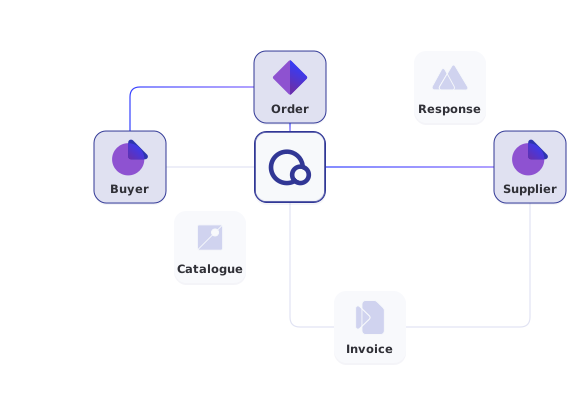
Ordering flow
Order to despatch
Orders, responses, changes and cancellations
Specifications
Peppol BIS specifications
Order Only, Ordering, Advanced Ordering, Order Agreement
Events
Signed webhooks
Received, delivered, delayed and failed
Availability
99.8% per month
Contractual, with service credits
The Peppol ordering flow in one API
Buyer and supplier each connect through their own Access Point. Your system posts and fetches the messages through Qvalia’s API, and Qvalia handles validation, recipient lookup and delivery on the Peppol network.
Receive an order and answer it
As a supplier, subscribe to the new document webhook, fetch unread orders and reply with an order response. As a buyer, post orders to the outgoing endpoint and follow the responses on the incoming one.
- Sandbox at api-test.qvalia.com, production at api.qvalia.com
- JSON by default, or UBL XML with the Content-Type and Accept headers
- An Idempotency-Key on every POST makes retries safe
● ● ●
Sandbox: fetch unread orders, then respond
# Fetch unread incoming orders (marks them as read)
curl "https://api-test.qvalia.com/transaction/$ACCOUNT_REG_NO/orders/incoming/readorders?limit=10" \
  -H "Authorization: $QVALIA_API_KEY" \
  -H "Accept: application/json"

# Reply with an order response
curl -X POST \
  "https://api-test.qvalia.com/transaction/$ACCOUNT_REG_NO/orderresponses/outgoing" \
  -H "Authorization: $QVALIA_API_KEY" \
  -H "Content-Type: application/json" \
  -H "Idempotency-Key: $(uuidgen)" \
  -d @order-response.json
Ordering messages and endpoints
Every path starts with /transaction/{accountRegNo}. Each message type has outgoing and incoming endpoints, a read endpoint for unread messages and a status endpoint.
| Message | Sent by | Endpoint | Peppol BIS |
| Order | Buyer | /orders | Order Only, Ordering, Advanced Ordering |
| Order response | Supplier | /orderresponses | Ordering, Advanced Ordering |
| Order change | Buyer | /order-changes | Advanced Ordering |
| Order cancellation | Buyer | /order-cancellations | Advanced Ordering |
| Order agreement | Supplier | /orderagreements | Order Agreement |
| Catalogue | Supplier | /catalogues | Catalogue |
| Catalogue response | Buyer | /catalogueresponses | Catalogue with response |
| Despatch advice | Supplier | /despatch-advices | Despatch Advice |
Which messages your account uses depends on the service and plan. Request and response schemas for each message are in the Order API reference. Invoices for delivered orders go through the Invoicing API. To check before sending that the recipient is registered for a message type, for example Order or OrderResponse, use the recipient lookup.
Choose your starting point
Suppliers
E-order management
Receive and answer Peppol orders in Qvalia’s web application, and turn them into invoices, before you build an integration.
Procurement platforms
Embedded Peppol
Send and receive orders for your own customers. The Partner API creates their accounts and Peppol IDs, and the Order API carries the messages.
E-commerce
Punchout
Connect your catalog to the buyer’s procurement system, so the shopping cart comes back as a structured order.


Order API FAQ
What is an order API?
An order API lets your system send and receive purchase orders, and the messages around them, in a structured format. Qvalia’s Order API carries Peppol BIS ordering messages as JSON or UBL XML and delivers them over the Peppol network.
Which ordering messages does the API support?
Orders, order responses, order changes, order cancellations, order agreements, catalogues with catalogue responses, and despatch advice. Each has outgoing and incoming endpoints.
What is the difference between Peppol BIS Ordering and Advanced Ordering?
Ordering covers the order and the order response. Advanced Ordering adds order changes and cancellations, so the buyer can amend or cancel an order after it is sent. Read What is Peppol BIS Ordering? and What is Peppol BIS Advanced Ordering?
Can I receive Peppol orders without an integration?
Yes. All Connect plans include receiving Peppol orders in Qvalia’s web application. API and sandbox access are included from the Connect Medium plan.
How do I know an order was delivered?
Subscribe to webhooks for delivery and error events, or read the status endpoint for orders. Any delivered event can be fetched again for 30 days by its event ID.
Can an order become an invoice?
Yes. In the Connect web application, order-to-invoice automation is included from the Medium plan. In your own integration, use the order data to create the invoice and send it through the Invoicing API.
Is there a sandbox?
Yes. The sandbox at api-test.qvalia.com uses its own API key, so you can test ordering flows without affecting live orders.


