
From order to invoice
Buyers that order over Peppol expect structured replies and an invoice that matches their order. Each step below is a Peppol document, so both sides work from the same data.

Order
The buyer sends the order from a procurement system or a punchout session, and you get a notification in Qvalia.

Order response
Accept, reject or change the order in a structured reply the buyer’s system can read.

Despatch advice
Tell the buyer what has been shipped and when, so the delivery can be matched against the order.

Invoice
Create the invoice from the order. It carries the order reference the buyer needs for matching.
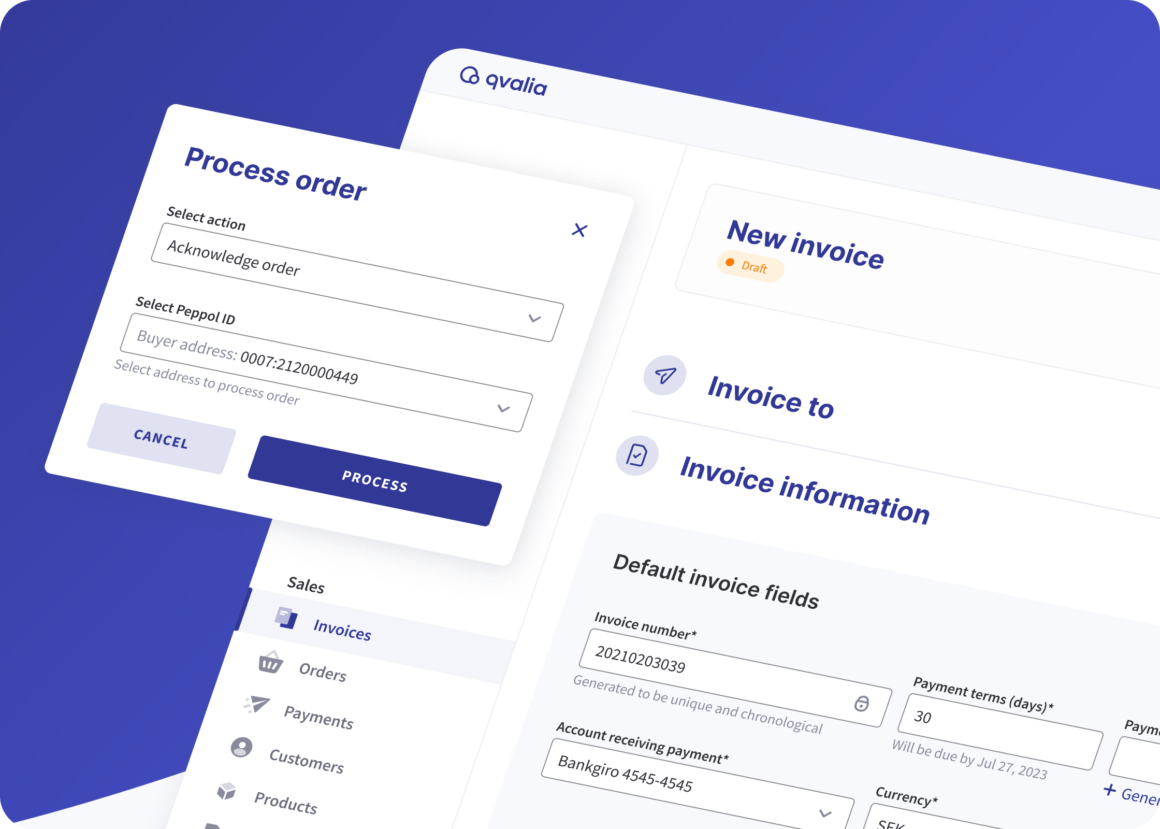
Peppol documents across the order-to-invoice flow
Orders, order responses, catalogues and despatch advice follow the Peppol BIS specifications. They can be exchanged with any buyer registered on Peppol to receive that document type.
- Order Only and Ordering
- Order change, cancellation and agreement
- Catalogue, with or without response
- Despatch advice and message level response
Where your customers’ orders come from
Procurement systems
Public sector and large buyers order from their own procurement system. Qvalia registers your Peppol ID, so their orders reach you.
Punchout
Buyers shop in your catalogue from their procurement system and send the Peppol order from there.
Your online store
Business customers choose to pay by invoice at checkout, and the order is recorded as a Peppol order.
Choose a plan for the documents your buyers use
Connect plans are self-service and billed monthly. Start with Small if you only receive orders, and move to Medium when buyers expect order responses, catalogues or despatch advice.
| Small | Medium | Large | |
| Receive and review Peppol orders | Included | Included | Included |
| Send e-invoices and PDF invoices | Included | Included | Included |
| Order responses | – | Included | Included |
| Catalogues | – | Included | Included |
| Despatch advice | – | Included | Included |
| Order-to-invoice | – | Included | Included |
| API and sandbox | – | Included | Included |
| Receive e-invoices and ERP connector apps | – | – | Included |
| Messages a month | 25 | 100 | 1,000 |
Connect 1X to 3X add higher volumes, and Enterprise covers more channels and formats by agreement.
Connect Qvalia to your ERP or order system
Start in the web app. When order volumes grow, orders can reach your ERP or order system through the Order API or SFTP, and invoices can go to your accounting system through a connector app.

Order management FAQ
Do we need an integration to receive Peppol orders?
No. You can receive, answer and invoice Peppol orders in the Qvalia web app. Larger volumes can come through the Order API or SFTP.
Which plan includes order responses and catalogues?
Connect Medium and above. Connect Small receives Peppol orders, and Medium adds order responses, catalogues, despatch advice, order-to-invoice and API access.
How do buyers reach us on Peppol?
Qvalia registers your company’s Peppol ID, your address in the network. Buyers send their orders to that ID.
Can we invoice directly from an order?
Yes. Order-to-invoice creates the invoice from the order data, so the invoice carries the buyer’s order reference. It is included from Connect Medium.
What is punchout?
Punchout lets a buyer shop in your catalogue from their own procurement system. The Peppol order that follows is handled like any other order.
Can we test before going live?
Yes. Connect Medium and above include a sandbox where you can test the API before you connect your own system.