Peppol tilbyr en standardisert infrastruktur for utveksling av elektroniske fakturaer og andre forretningsdokumenter. Men standardisering betyr ikke at alle transaksjoner vil fungere automatisk.
En faktura kan mislykkes fordi dataene er ugyldige, mottakeren ikke kan finnes, feil forretningsprosess brukes eller kjøperen avviser den etter levering. Bedrift miljøer, kan den underliggende årsaken ligge hvor som helst mellom ERP, fakturakartlegging, masterdata , Peppol-oppdagelsestjenester og aksesspunkt .
Denne veiledningen forklarer ti vanlige Peppol-fakturafeil. Hver seksjon starter med det praktiske problemet i et enkelt språk og undersøker deretter de relevante tekniske detaljene for Bedrift og ERP-integrasjonsteam.
Teknisk omfang: Vurdert mot Peppol BIS Billing 3.0 versjon 3.0.21 og OpenPeppol eDelivery-spesifikasjonene tilgjengelige i august 2026. Landsspesifikke krav og spesifikasjoner fortsetter å endres.
Tre typer Peppol-fakturafeil
Før feilsøking, finn ut hvor feilen oppsto.
| Feiltype | Beskrivelse | Konsekvens |
|---|---|---|
| Validering | Fakturaen inneholder manglende, feil formaterte eller inkonsistente data | Fakturaen er avvist som ugyldig |
| Oppdagelse eller ruting | Peppol finner ikke en kompatibel mottakstjeneste for mottakeren | Fakturaen kan ikke leveres |
| Forretningsbehandling | Fakturaen ble levert, men kjøperen kan ikke godkjenne eller behandle den. | Fakturaen er forespurt eller avvist |
Disse feilene krever ulike tiltak. Å sende en uendret faktura på nytt vil ikke korrigere ugyldige data. Endring av fakturaen vil ikke hjelpe hvis mottakerens Peppol-registrering er ufullstendig. En vellykket transportkvittering betyr ikke at kjøperen har godkjent fakturaen.
1. Mottakerens Peppol ID er feil
EN Peppol ID fungerer som en nettverksadresse, men det er ikke alltid nok å oppgi riktig organisasjonsnummer. Identifikatoren må bruke riktig skjema og samsvare nøyaktig med identifikatoren som mottakeren er registrert under.
En tilsynelatende liten forskjell – som feil prefiks, en fjernet innledende null eller bruk av et MVA-nummer i stedet for en nasjonal virksomhetsidentifikator – kan hindre Peppol i å finne mottakeren.
Slik fikser du Peppol ID feil
Lagre Peppol-identifikatoren som kontrollert masterdata snarere enn fritekst. Identifikasjonsskjemaet og verdien bør holdes separat og valideres før fakturering.
Før sending:
- Bekreft mottakeren med et gyldig Peppol ID søk .
- Bekreft den relevante juridiske enheten, ikke bare konsernet.
- Behold innledende nuller og nødvendig formatering.
- Unngå å legge til eller fjerne landsprefikser automatisk.
- Etabler eierskap til Peppol-identifikatorer i kundens stamdataprosess.
Tekniske detaljer
Peppol-deltakeridentifikatorer består av et skjema og en verdi. De tillatte skjemaene vedlikeholdes i OpenPeppols kodeliste for deltakeridentifikatorer.
Peppol BIS Billing krever også elektroniske adresser for selger og kjøper. Regler PEPPOL-EN16931-R010 og R020 gjør de respektive endepunktelementene obligatoriske, mens den gjeldende kodelisteregelen kontrollerer det elektroniske adresseskjemaet.
Identifikatorene som brukes i fakturaen og i Peppol-transportkonvolutten opererer på forskjellige lag. ERP-tilordninger og aksesspunkt Integrasjoner må fylle dem ut konsekvent i henhold til den relevante profilen.
2. Mottakeren er registrert, men ikke for dokumentet som sendes
Et selskap kan være til stede i Peppol uten å kunne motta alle typer Peppol-dokumenter.
For eksempel kan en mottaker være registrert for å motta standard Peppol-meldinger. BIS Billing fakturaer, men ikke en bestemt PINT-faktura, bestillingsmelding eller forretningsprosess. Peppol ID er gyldig, men den forespurte mottaksmuligheten er ikke tilgjengelig.
Slik fikser du det
Ikke behandle registrering som et enkelt ja-eller-nei-attributt i ERP-systemet. Det relevante spørsmålet er om mottakeren kan motta den nøyaktige kombinasjonen av dokumenttype og forretningsprosess som sendes.
Integrasjonen din bør:
- Sjekk mottakerens nåværende muligheter.
- Velg en støttet dokumenttype og prosess.
- Håndter funksjonsendringer uten behov for manuell ERP-omkonfigurering.
- Returner en klar feilmelding til brukeren når mottakeren er registrert, men inkompatibel med det valgte dokumentet.
Tekniske detaljer
Mottaksfunksjoner publiseres gjennom en tjenestemetadatapubliser, eller SMP. Metadataene kobler en deltakeridentifikator med støttede dokumenttyper, prosessidentifikatorer, transportprofiler, endepunkter og sertifikater.
Sendingen aksesspunkt utfører et kapasitetssøk før levering. Hvis mottakeren aksesspunkt ikke betjener deltakeren for den forespurte dokumenttypen og prosessen, definerer Peppol AS4-spesifikasjonen en feil med detaljene PEPPOL:NOT_SERVICED.
Den nåværende valgfrie Peppol Billing-with-Response-profilen krever også sin egen SMP-registrering. Støtte for standard fakturering innebærer ikke automatisk støtte for alle relaterte profiler.
3. Oppdagelsesinformasjonen er utdatert eller midlertidig utilgjengelig
Selv når fakturaen og Peppol ID er riktige, kan det hende at nettverket midlertidig ser på feil sted.
Dette kan skje når et selskap bytter Peppol-tjenesteleverandør, når gammel rutingsinformasjon forblir mellomlagret eller mens endringer formidles. Avsenderen kan se en feil som antyder at mottakeren ikke finnes, selv om det faktiske problemet gjelder utdatert oppdagelsesinformasjon.
Slik fikser du utdatert oppdagelsesinformasjon
ERP-applikasjoner bør ikke forsøke å reprodusere hele Peppol-oppdagelsesprosessen selv, med mindre dette er en bevisst del av produktarkitekturen. Oppdagelse, sertifikatvalidering, ruting og håndtering av nye forsøk håndteres vanligvis bedre av Peppol-tjenesteleverandøren.
ERP og Bedrift Lagene bør fortsatt sørge for at:
- Feil skiller ugyldige fakturadata fra oppdagelsesfeil.
- Midlertidige feil blir forsøkt på nytt i henhold til en kontrollert policy.
- Gjentatte forsøk oppretter ikke dupliserte fakturaer.
- Migreringer av tjenesteleverandører planlegges og overvåkes.
- Bufrede mottakerfunksjoner oppdateres når det er nødvendig.
- Driftsteam kan spore hvilket endepunkt og hvilken funksjon som ble løst.
Tekniske detaljer
Peppol-oppdagelsen bruker Service Metadata Locator og DNS for å finne den autoritative SMP-en for en deltaker. SMP-en gir deretter signerte metadata for den forespurte dokumenttypen og prosessen.
Gjeldende OpenPeppol-spesifikasjoner bruker NAPTR-basert oppdagelse og HTTPS-tilgjengelige SMP-tjenester. SMP-metadata kan også omdirigere et oppslag til en sekundær SMP, selv om klienter bare trenger å følge ett omdirigeringsnivå.
Feil kan skyldes foreldede hurtigbuffere, ufullstendig deltakermigrering, utilgjengelig DNS-løsning, ugyldige metadatasignaturer, utløpt endepunktinformasjon eller sertifikatproblemer. Dette er infrastrukturfeil snarere enn feil i fakturainnholdet.
4. Feil Peppol-profil eller spesifikasjonsidentifikator er brukt
Hver Peppol-faktura angir hvilke regler den følger og hvilken forretningsprosess den tilhører. Hvis disse identifikatorene mangler eller er feil, kan ikke mottakssystemet tolke dokumentet på en sikker måte.
Dette skjer ofte når et ERP-system eksporterer en gammel fakturamal, en konverter setter inn feil verdi, eller en tilordning som er utformet for ett land eller en prosess, brukes på nytt et annet sted.
Slik fikser du feil profil
Profil- og spesifikasjonsidentifikatorer bør kontrolleres sentralt. De bør ikke kunne redigeres av brukere eller rekonstrueres separat i hver ERP-kobling.
For miljøer med flere markeder:
- Vedlikehold støttede profiler som versjonskontrollert konfigurasjon.
- Separat standard Peppol BIS Billing fra PINT og nasjonale varianter.
- Valider den valgte profilen mot mottakerens muligheter.
- Regresjonstesttilordninger når spesifikasjoner eller kodelister endres.
- Hindre lokale implementeringer i å overstyre kontrollerte identifikatorer.
Tekniske detaljer
I Peppol BIS Billing , CustomizationID identifiserer spesifikasjonen som er brukt på fakturaen og ProfileID identifiserer forretningsprosessen.
Regler PEPPOL-EN16931-R004 og R007 valider disse verdiene. For standard faktureringsprosess inkluderer de forventede identifikatorene:
CustomizationID:urn:cen.eu:en16931:2017#compliant#urn:fdc:peppol.eu:2017:poacc:billing:3.0ProfileID:urn:fdc:peppol.eu:2017:poacc:billing:01:1.0
En annerledes ProfileID brukes for den valgfrie faktureringsprosessen med svar. Dokumentidentifikatorene, transportkonvolutten og SMP-funksjonaliteten må beskrive en kompatibel prosess.
5. Kjøper- eller bestillingsreferansen mangler eller er feil
Fakturaen trenger informasjon som forteller kjøperen hvem som bestilte varene eller hvilken bestilling fakturaen tilhører.
Uten denne referansen kan det hende at kjøperen ikke vet hvor fakturaen skal sendes. Peppol krever derfor enten en kjøperreferanse eller en bestillingsreferanse.
Å legge til «N/A» kan få feltet til å se fullstendig ut, men det gir ikke kjøperen brukbar informasjon.
Slik fikser du manglende ordrereferanse
Registrer den nødvendige referansen før fakturaen opprettes. Ikke stol på at kundefordringsteamene reparerer manglende informasjon etter at fakturaen har mislyktes.
En skalerbar prosess bør:
- Innhent referansen under bestilling, betaling eller kontraktsinngåelse.
- Valider kundespesifikke formater der det er mulig.
- Lagre verdien i riktig ERP-felt.
- Forhindre at plassholderverdier settes inn automatisk.
- Returner manglende referanser til den ansvarlige forretningsprosessen, ikke bare til IT.
Tekniske detaljer
Regel PEPPOL-EN16931-R003 krever enten kjøperreferanse, forretningsbegrep BT-10, eller bestillingsreferanse, forretningsbegrep BT-13.
Dette er elementer på dokumentnivå. En ordrelinjereferanse er et separat fakturalinjekonsept. Å plassere et bestillingsnummer i en fakturaseddel, beskrivelse, vedlegg eller vilkårlig fakturalinje oppfyller ikke det semantiske kravet.
XML-en kan bestå en enkel ikke-tom sjekk når «N/A» brukes, men fakturaen kan fortsatt ikke bestå kjøperens forretningsvalidering eller samsvarsprosess.
6. MVA-informasjonen er inkonsekvent eller ugyldig
En faktura kan inneholde riktig totalbeløp, men likevel mislykkes fordi mva-informasjonen ikke gir mening.
Valgt momskategori, momssats og fritaksårsak må stemme overens. Ytterligere nasjonale krav kan gjelde avhengig av hvilke land det er snakk om.
Slik retter du opp ugyldig MVA-informasjon
Ikke behandle MVA som et formateringsproblem som håndteres av fakturakonverteringsprogrammet. Skattefastsettelse bør skje i riktig ERP- eller skattemotor før fakturaen genereres.
Bedrift kontrollene bør dekke:
- Kombinasjoner av momskategori og satser
- Unntaksårsaker og koder
- MVA-identifikatorer for selger og kjøper
- Grenseoverskridende og innenlandske skattescenarioer
- Landsspesifikke Peppol-valideringsregler
- Endringer i skattekonfigurasjon og kodelister
En strukturelt gyldig faktura er ikke nødvendigvis basert på riktig juridisk skattebehandling. Usikre skattescenarier bør gjennomgås av en kvalifisert skattespesialist.
Tekniske detaljer
Peppol BIS Billing gjelder EN 16931-regler, Peppol-spesifikke regler og godkjente landsspesifikke valideringsregler.
Den gjeldende regelkonteksten kan avhenge av leverandørens land og, for visse nasjonale regler, kjøperens land. MVA-kategorikoder, satser, fritaksårsaker og MVA-identifikatorer valideres som relaterte forretningsvilkår i stedet for uavhengige tekstfelt.
En validator kan oppdage inkonsistente kombinasjoner og ugyldige formater. Den kan ikke uavhengig avgjøre om den kommersielle transaksjonen ble klassifisert riktig for skatteformål.
7. Totaler, avrundinger, rabatter eller gebyrer stemmer ikke overens
Tallene på fakturaen må summere seg i henhold til definerte beregningsregler.
Problemer oppstår ofte når ERP-systemet, skattesystemet og fakturakonverteringssystemet beregner de samme verdiene forskjellig. En forskjell på én cent kan være nok til å forårsake en fatal valideringsfeil.
Slik retter du feilaktige beregninger
Bruk én dokumentert beregnings- og avrundingsmodell gjennom hele fakturaprosessen.
Vær spesielt oppmerksom på:
- Avrunding på linjenivå
- Flere mva-satser
- Prisbasismengder
- Rabatter på dokument- og linjenivå
- Frakt og andre avgifter
- Kreditnotaer og negative verdier
- Valutakonvertering og MVA-regnskapsvaluta
- Transformasjoner mellom ERP- og Peppol-formater
Valider alltid den endelige XML-en som produseres for overføring. Validering av kun ERP-kildedataene vil ikke oppdage feil introdusert av mapping- eller konverteringslaget.
Tekniske detaljer
Peppol- og EN 16931-reglene validerer beregninger på flere nivåer.
Eksempler inkluderer:
PEPPOL-EN16931-R120beregning av nettobeløpet på fakturalinjenBR-CO-10Summen av nettobeløpene på fakturalinjen må være lik dokumentets linjetotalPEPPOL-EN16931-R040-R042: samsvar mellom godtgjørelses- eller gebyrbeløp, grunnbeløp og prosentandelPEPPOL-EN16931-R051Valutaidentifikatorer må være i samsvar med fakturavalutaen, med forbehold om det definerte unntaket
Rabatter og gebyrer bør bruke de strukturerte godtgjørelses- og gebyrelementene. De bør ikke fremstilles som kunstige produkter bare for å tvinge totalen til å avstemme.
8. Tomme elementer eller feil tilordnede fakturalinjer
En strukturert faktura er ikke en digital versjon av en papirfaktura. Blanke rader, visuelle skilletegn og vilkårlig tekst skal ikke konverteres til fakturalinjer.
Hvert felt og hver linje har en definert betydning. Bruk av et felt til noe annet kan sende data til kjøperen, men det hindrer pålitelig automatisering.
Slik retter du feil felt
ERP-tilordninger bør være semantiske snarere enn visuelle. Tilordne informasjon i henhold til hva den betyr, ikke hvor den vises på en gjengitt faktura.
Vanlige kontroller inkluderer:
- Utelatelse av valgfrie felt når det ikke finnes noen verdi
- Fjerner layoutdrevne tomme rader
- Holde betalingsinformasjon ute av produktbeskrivelser
- Bruk av strukturerte godtgjørelses- og gebyrfelt
- Tilordne ordrereferanser til riktig nivå
- Bevaring av produktidentifikatorer, mengder, enheter og avgiftsdata
- Bruk kun notater for genuint ustrukturert informasjon
Tekniske detaljer
Regel PEPPOL-EN16931-R008 sier at et dokument ikke må inneholde tomme elementer.
En fakturalinje er en strukturert gruppe som inneholder nødvendige elementer som linjeidentifikator, antall, linjenettobeløp, vareinformasjon og pris. Den kan også inkludere strukturerte regnskaps-, periode-, referanse-, godtgjørelses-, gebyr- og klassifiseringsdata.
Et helt tomt element bør utelates. En dummy-linje som inneholder kunstige verdier kan unnslippe regelen for tomme elementer, men likevel skape problemer for kjøperen med samsvar, regnskap og analyse.
9. Viktig fakturainformasjon finnes kun i et vedlegg
En PDF-fil eller annen fil kan legges ved en Peppol-faktura, men mottakeren skal ikke måtte åpne den for å forstå eller behandle transaksjonen.
Hvis bestillingsnummeret, betalingsdetaljer, mva-informasjon eller linjebeskrivelser bare finnes i PDF-filen, mister kjøperen mye av automatiseringen som strukturert e-fakturering er ment å gi.
Slik bruker du vedlegg
Behandle vedlegg som støttemateriale. Oppbevar nødvendig og driftsmessig viktig informasjon i strukturerte fakturafelt.
Vedlegg kan være passende for:
- Timeregistreringer
- Leveringsdokumentasjon
- Spesifikasjoner
- Støttende beregninger
- Annen dokumentasjon som kjøperen ber om
Bekreft også krav til medietype, filnavn og størrelse. Tjenesteleverandører og mottakssystemer kan pålegge driftsbegrensninger selv om selve filtypen støttes.
Tekniske detaljer
Nåværende Peppol BIS Billing støtter ytterligere støttedokumenter som innebygde binære objekter eller eksterne referanser. Innebygde filer krever en tillatt MIME-kode og filnavn.
Eldre Peppol-retningslinjer oppga at det å legge ved en PDF-kopi av fakturaen ikke var i samsvar med regelverket. OpenPeppol fjernet denne uttalelsen fra BIS Billing versjon 3.0.20. En PDF-kopi er derfor ikke forbudt på det grunnlaget, men den erstatter ikke den strukturerte fakturaen.
Spesifikasjonen rettferdiggjør ikke behandling av en bestemt PDF-oppløsning, for eksempel 600 dpi, som en generell Peppol-samsvarsgrense.
10. Vellykket levering forveksles med fakturagodkjenning
«Levert» betyr ikke «godkjent for betaling».
Peppol kan transportere en teknisk gyldig faktura, men kjøperen kan fortsatt bestride eller avvise den fordi prisen er feil, bestillingen ikke samsvarer, varer ikke er mottatt eller feil juridisk enhet ble fakturert.
Slik bruker du statuser
ERP- og finansbrukere trenger mer enn en sendt/mislykket status. Integrasjonen bør skille mellom:
- Opprettet
- Validert
- Innsendt
- Levert
- Behandling
- Under spørring
- Godkjent
- Avvist
- Betalt, der det støttes av forretningsprosessen
Svarene skal være knyttet til den opprinnelige fakturaen og presentert på en måte som gjør det mulig for det ansvarlige teamet å handle. Automatiske nye forsøk må ikke opprette dupliserte fakturaer.
Tekniske detaljer
Peppol bruker forskjellige mekanismer på forskjellige lag:
- AS4-kvitteringer og -feil gir informasjon på transportnivå.
- Peppol Message Level Status, eller MLS, støtter behandlingsstatus for tjenesteleverandører.
- Peppol Fakturarespons formidler forretningsstatuser i kjøperens godkjennings- og betalingsprosess.
OpenPeppol introduserte MLS i det nåværende eDelivery-rammeverket og fases ut den eldre mekanismen for svar på meldingsnivå. ERP-integrasjoner bør derfor unngå å behandle én eldre svartype som den permanente modellen.
Fakturasvar kan kommunisere statuser som bekreftet, under behandling, under forespørsel, betinget godkjent eller avvist. Støtten avhenger av den valgte profilen og funksjonene som er registrert av deltakerne.
Å bygge en mer pålitelig Bedrift Peppol-prosessen
Pålitelig e-fakturering krever mer enn å generere gyldig XML. Hele prosessen må håndtere:
- Kunde og leverandør masterdata
- Peppol-identifikasjonsordninger
- Mottakeroppdagelse og muligheter for oppslag
- Profil- og dokumentvalg
- ERP-til-Peppol-datakartlegging
- EN 16931 og Peppol-validering
- Landspesifikke krav
- Sikker ruting gjennom tilgangspunkter
- Tekniske og forretningsmessige svar
- Overvåking, sporbarhet og kontrollerte nye forsøk
Til Bedrift organisasjoner, bør disse funksjonene sentraliseres snarere enn å bygges opp uavhengig i hvert ERP-system, datterselskap eller marked.
For ERP- og plattformpartnere bør Peppol-tilkobling eksponeres som en administrert tjeneste med stabile API-er, tydelige feilkategorier og handlingsrettede svar. Brukere skal ikke trenge å forstå SMP-poster eller Schematron-regler for å korrigere en faktura – men integrasjonen må håndtere dem riktig under.
Connect til Peppol
Qvalia tilbyr full Peppol-tilkobling for bedrifter, ERP-leverandører og programvareplattformer gjennom API-er og filbaserte integrasjoner. Plattformen håndterer strukturert dokumentutveksling, deltakergjenkjenning, validering, svarmeldinger, feilhåndtering og transaksjonssporbarhet.
Utforsk Qvalia Peppol aksesspunkt .
Tekniske referanser
Relaterte artikler
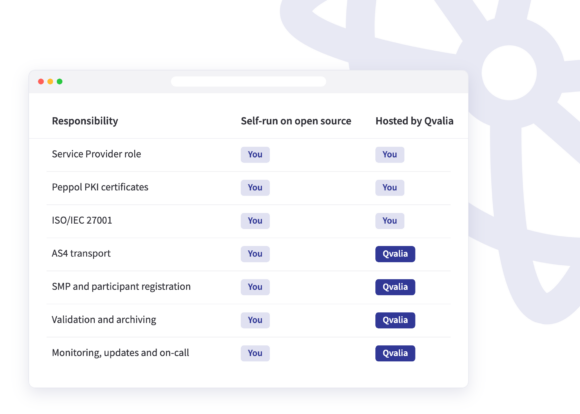
Slik setter du opp din egen Peppol aksesspunkt kjør det selv på åpen kildekode-programvare som Oxalis eller Phase4, eller outsource driften til en vertsbasert aksesspunkt Hva hver rute dekker, nettverkskravene for 2027 og nasjonal akkreditering.
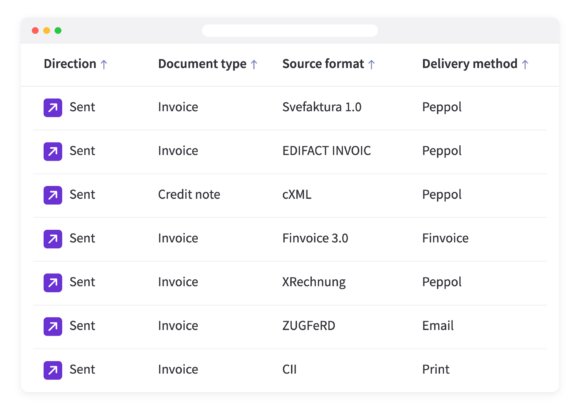
Qvalias transaksjons-API aksepterer nå Svefaktura 1.0, EDIFACT, cXML, Finvoice, XRechnung, CII og ZUGFeRD, og konverterer dem til Peppol. BIS Billing 3.0 og leverer dem.
Qvalia er nå koblet til ELMA, Digitaliseringsdirektoratets mottakerregister for det norske markedet. Dette betyr at vi kan registrere kundene våre i …